Here's
how Quilt Design Wizard works:

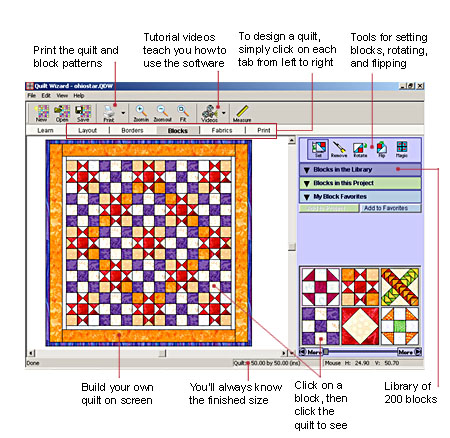
 Start by selecting a layout style, mattress size,
and block size. Then add borders. Quilt Design Wizard™ guides
you step-by-step using an easy point-and-click method.
Start by selecting a layout style, mattress size,
and block size. Then add borders. Quilt Design Wizard™ guides
you step-by-step using an easy point-and-click method.
Select from 200 quilt blocks coloured with
beautiful fabric and ready to set into your layout. Blocks are
colour-coordinated in colour families to help you choose blocks
that work well together. You'll be an instant designer with the
Wizard's help.

 Colour
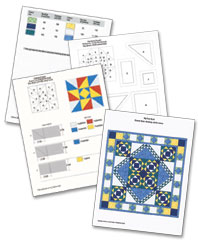
the borders and you're ready to print! Quilt Design Wizard™
prints fabric yardage estimates, rotary cutting charts, and
sewing instructions for each block. If you prefer templates or
foundation piecing patterns, Quilt Design Wizard™ prints those
too!
Colour
the borders and you're ready to print! Quilt Design Wizard™
prints fabric yardage estimates, rotary cutting charts, and
sewing instructions for each block. If you prefer templates or
foundation piecing patterns, Quilt Design Wizard™ prints those
too!
You'll save hours because Quilt Design Wizard™
does all the computing, calculating, and scaling. You just click
print!

 The
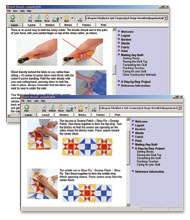
designing is done. The patterns and yardage estimates are
printed. You're ready to sew! Quilt Design Wizard™ is loaded
with every bit of information you'll need. From buying supplies
and fabrics, to assembly and quilting, to finishing and storing
your quilt – Quilt Design Wizard™ has it all.
The
designing is done. The patterns and yardage estimates are
printed. You're ready to sew! Quilt Design Wizard™ is loaded
with every bit of information you'll need. From buying supplies
and fabrics, to assembly and quilting, to finishing and storing
your quilt – Quilt Design Wizard™ has it all.

200 Blocks
Whether you prefer the traditional charm of the
Log Cabin block or the whimsical fun of a pictorial Tractor
block, you're sure to find something to suit your taste.
3000 Fabrics
Varied and vibrant fabrics invite you to play
with color. Experiment with hundreds of color combinations on
screen before you ever cut the fabric.
Versatile layouts and borders
From simple wall quilts to large bed quilts, try
out your ideas. Create hundreds of different combinations of
horizontal and on-point layouts. Add as many borders as you
like. Perfect for beginners or seasoned quilters.

Because you don't have to worry about the hassle
of drawing blocks or scanning fabrics in Quilt Design Wizard™,
we still wanted you to have the chance to update the content of
your software. Quilt Design Wizard™ has a website all its own.
You can get a free downloadable Quilt Design Wizard™ project
with all new blocks and fabrics each month. Monthly projects are
archived, so be sure to get all the ones you like. While you are
on the website check out the gallery of quilts.
Visit the Quilt Design Wizard™ website.
| Quilt Design Wizard™ comes with a
printable user manual and CD. You need Adobe Reader to open
and print the manual. |


